Micrometer & Prometheus in Spring Boot: Kafka Burger Orders
 Vincent Vauban
👨💻 GitHub: https://github.com/vinny59200/dukeburger
🔵⚪⚪⚪⚪⚪⚪⚪⚪⚪⚪⚪
TL;DR
This guide shows how to use Micrometer and Prometheus in Spring Boot to track a custom metric for a Kafka-driven Burger Orders app. You’ll post a burger order to a REST endpoint, publish it to Kafka, consume the topic, and increment a counter for all “DukeBurger” orders. Copy the snippets, run, and you’ll see your metric on /actuator/prometheus.
🔵🔵⚪⚪⚪⚪⚪⚪⚪⚪⚪⚪
Why Micrometer and Prometheus?
Micrometer is a vendor-neutral metrics facade. Your code records counters, timers, and gauges once; Micrometer ships those to many backends (Prometheus, Datadog, etc.) via simple registries. Prometheus is a time-series database that pulls metrics by scraping an HTTP endpoint periodically (Spring exposes /actuator/prometheus). Micrometer Application Observability
Key ideas:
- Micrometer offers a simple API:
Counter,Timer,Gauge. - Spring Boot Actuator autoconfigures Micrometer and exposes metrics endpoints, including Prometheus format. See
- Prometheus “scrapes,” so your app just exposes a text endpoint—no push needed. docs.micrometer.io
🔵🔵🔵⚪⚪⚪⚪⚪⚪⚪⚪⚪
What the Burger Orders App Does
- Order a burger via HTTP POST
/orders?burger=DukeBurger. - Produce an Avro message to Kafka topic
burger.orders. - Consume
burger.orderswith@KafkaListener. - Increment a Micrometer Counter named
events_DukeBurger_totalwhenever the burger is"DukeBurger". - Expose metrics at
/actuator/prometheusfor Prometheus to scrape.
This pattern is common: REST → Kafka → Consumer → Metric. Spring Kafka makes producing and consuming concise; Micrometer makes metrics easy. See
🔵🔵🔵🔵⚪⚪⚪⚪⚪⚪⚪⚪
The Data Contract (Avro)
{
  "type": "record",
  "name": "BurgerOrder",
  "namespace": "com.vv.burger",
  "fields": [
    { "name": "burger", "type": "string" },
    { "name": "timestamp", "type": "string" }
  ]
}
Why: A tiny schema keeps the demo clear. Avro gives you compact messages and generated classes.
🔵🔵🔵🔵🔵⚪⚪⚪⚪⚪⚪⚪
Hot Spots: Minimal Code You Need
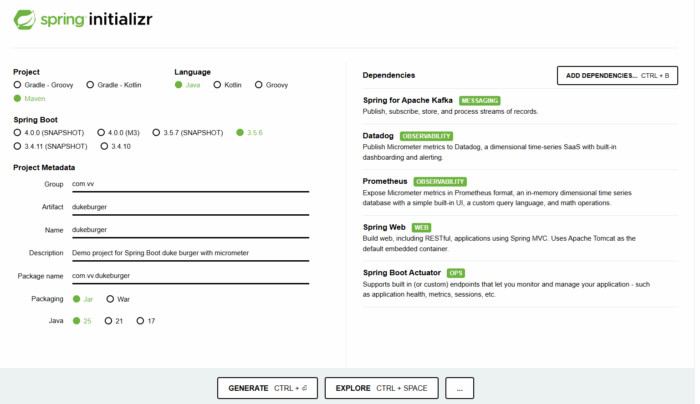
Spring initializer for Micrometer & Prometheus in Spring Boot: Kafka Burger Orders
1) Expose a Counter with Tags (Micrometer)
package com.vv.burger.config;

import io.micrometer.core.instrument.Counter;
import io.micrometer.core.instrument.MeterRegistry;
import io.micrometer.core.instrument.Tag;
import io.micrometer.core.instrument.Tags;
import org.springframework.context.annotation.Bean;
import org.springframework.context.annotation.Configuration;

@Configuration
public class MetricsConfig {

    @Bean
    public Counter burgerOrderCounter(MeterRegistry registry) {
        // Common tags for the burger app
        Tags tags = Tags.of(
                Tag.of("app", "burger-service"),
                Tag.of("topic", "burger.orders")
                           );

        return Counter.builder("events_DukeBurger_total")
                      .description("Count of DukeBurger order events processed")
                      .baseUnit("orders")
                      .tags(tags)
                      .register(registry);
    }
}
Side note: We add consistent tags now (app, topic) so you can filter and graph later. See
🔵🔵🔵🔵🔵🔵⚪⚪⚪⚪⚪⚪
2) REST Controller → Produce to Kafka
package com.vv.burger.controller;

import com.vv.burger.BurgerOrder;
import org.apache.kafka.clients.producer.ProducerRecord;
import org.springframework.beans.factory.annotation.Value;
import org.springframework.kafka.core.KafkaTemplate;
import org.springframework.web.bind.annotation.PostMapping;
import org.springframework.web.bind.annotation.RequestMapping;
import org.springframework.web.bind.annotation.RequestParam;
import org.springframework.web.bind.annotation.RestController;

import java.nio.charset.StandardCharsets;
import java.time.OffsetDateTime;
import java.util.UUID;

@RestController
@RequestMapping( "/orders" )
public class OrderController {

    private final KafkaTemplate<String, BurgerOrder> kafkaTemplate;
    private final String                             topic;

    public OrderController( KafkaTemplate<String, BurgerOrder> kafkaTemplate,
                            @Value( "${app.kafka.topic}" ) String topic ) {
        this.kafkaTemplate = kafkaTemplate;
        this.topic = topic;
    }

    @PostMapping
    public String sendOrder( @RequestParam String burger ) {
        // 1. Build the Avro payload (BurgerOrder must be a generated Avro class)
        BurgerOrder order = BurgerOrder.newBuilder()
                                       .setBurger( burger )
                                       .setTimestamp( OffsetDateTime.now()
                                                                    .toString() )
                                       .build();

        // 2. Create CloudEvent metadata as headers
        String id = UUID.randomUUID()
                        .toString();
        OffsetDateTime now = OffsetDateTime.now();

        ProducerRecord<String, BurgerOrder> record = new ProducerRecord<>( topic, order );
        record.headers()
              .add( "ce_id", id.getBytes( StandardCharsets.UTF_8 ) );
        record.headers()
              .add( "ce_type", "BurgerOrder".getBytes( StandardCharsets.UTF_8 ) );
        record.headers()
              .add( "ce_source", "http://localhost/orders".getBytes( StandardCharsets.UTF_8 ) );
        record.headers()
              .add( "ce_specversion", "1.0".getBytes( StandardCharsets.UTF_8 ) );
        record.headers()
              .add( "ce_time", now.toString()
                                  .getBytes( StandardCharsets.UTF_8 ) );
        record.headers()
              .add( "ce_subject", "order".getBytes( StandardCharsets.UTF_8 ) );
        record.headers()
              .add( "ce_datacontenttype", "application/avro".getBytes( StandardCharsets.UTF_8 ) );

        // 3. Send the record
        kafkaTemplate.send( record );

        return "✅ Order sent to Kafka: " + burger;
    }
}
Side note: The headers mimic CloudEvents so you can plug into event tooling later. This is optional for the metric. Cloud Events
🔵🔵🔵🔵🔵🔵🔵⚪⚪⚪⚪⚪
3) Kafka Consumer → Count “DukeBurger”
package com.vv.burger.consumer;

import com.vv.burger.BurgerOrder;
import io.cloudevents.CloudEvent;
import io.cloudevents.core.builder.CloudEventBuilder;
import io.micrometer.core.instrument.Counter;
import org.apache.kafka.clients.consumer.ConsumerRecord;
import org.apache.kafka.common.serialization.StringDeserializer;
import org.springframework.context.annotation.Bean;
import org.springframework.kafka.annotation.KafkaListener;
import org.springframework.kafka.config.ConcurrentKafkaListenerContainerFactory;
import org.springframework.kafka.core.ConsumerFactory;
import org.springframework.stereotype.Component;

import java.net.URI;
import java.time.OffsetDateTime;
import java.util.Map;

@Component
public class ConsumerApp {

    // Injects the Counter bean defined in MetricsConfig (events_DukeBurger_total)
    private final Counter burgerOrderCounter;

    public ConsumerApp( final Counter burgerOrderCounter ) {
        this.burgerOrderCounter = burgerOrderCounter;
    }

    @KafkaListener( topics = "burger.orders",
                    groupId = "group1" )
    public void receive( ConsumerRecord<String, BurgerOrder> record ) {
        BurgerOrder order = record.value();

        // Optionally reconstruct CloudEvent from headers
        CloudEvent cloudEvent = CloudEventBuilder.v1()
                                                 .withId( getHeader( record, "ce_id" ) )
                                                 .withType( getHeader( record, "ce_type" ) )
                                                 .withSource( URI.create( getHeader( record, "ce_source" ) ) )
                                                 .withSubject( getHeader( record, "ce_subject" ) )
                                                 .withTime( OffsetDateTime.parse( getHeader( record, "ce_time" ) ) )
                                                 .withDataContentType( getHeader( record, "ce_datacontenttype" ) )
                                                 .withData( "application/avro", order.toString()
                                                                                     .getBytes() ) // optional
                                                 .build();

        System.out.println( "📥 Received order: " + order.getBurger() + " at " + order.getTimestamp() );
        System.out.println( "🧾 CloudEvent type: " + cloudEvent.getType() + ", id: " + cloudEvent.getId() );

        if ( isDukeBurger( order ) ) {
            burgerOrderCounter.increment();
        }
    }

    private boolean isDukeBurger( final BurgerOrder order ) {
        return "DukeBurger".equals( order.getBurger()
                                         .toString() );
    }

    private String getHeader( ConsumerRecord<?, ?> record, String key ) {
        return new String( record.headers()
                                 .lastHeader( key )
                                 .value() );
    }

    @Bean
    public ConcurrentKafkaListenerContainerFactory<String, BurgerOrder> kafkaListenerContainerFactory() {
        ConcurrentKafkaListenerContainerFactory<String, BurgerOrder> factory =
                new ConcurrentKafkaListenerContainerFactory<>();
        factory.setConsumerFactory( consumerFactory() );
        return factory;
    }

    public ConsumerFactory<String, BurgerOrder> consumerFactory() {
        Map<String, Object> props = Map.of(
                "bootstrap.servers", "kafka:9092",
                "group.id", "group1",
                "key.deserializer", StringDeserializer.class.getName(),
                "value.deserializer", io.confluent.kafka.serializers.KafkaAvroDeserializer.class.getName(),
                "schema.registry.url", "http://schema-registry:8081",
                "specific.avro.reader", true
                                          );

        return new org.springframework.kafka.core.DefaultKafkaConsumerFactory<>( props );
    }
}
Side note: @KafkaListener binds the method to the topic with minimal boilerplate. Keep consumer config small for a first run. See
🔵🔵🔵🔵🔵🔵🔵🔵⚪⚪⚪⚪
4) Avro Bytes → Object (utility)
package com.vv.burger.consumer;

import com.vv.burger.BurgerOrder;
import org.apache.avro.io.BinaryDecoder;
import org.apache.avro.io.DecoderFactory;
import org.apache.avro.specific.SpecificDatumReader;

import java.io.ByteArrayInputStream;

public class AvroUtils {
    public static BurgerOrder fromBytes( byte[] bytes ) {
        try ( ByteArrayInputStream in = new ByteArrayInputStream( bytes ) ) {
            SpecificDatumReader<BurgerOrder> reader = new SpecificDatumReader<>( BurgerOrder.class );
            BinaryDecoder decoder = DecoderFactory.get()
                                                  .binaryDecoder( in, null );
            return reader.read( null, decoder );
        } catch ( Exception e ) {
            throw new RuntimeException( "Failed to deserialize BurgerOrder Avro event", e );
        }
    }
}
Side note: Spring Kafka + Confluent deserializer already returns BurgerOrder, so you rarely need this. It’s useful in tests or when you manually handle bytes.
🔵🔵🔵🔵🔵🔵🔵🔵🔵⚪⚪⚪
Application Properties (essentials)
spring:
  application:
    name: burger-service

# Kafka
app:
  kafka:
    topic: burger.orders

# Actuator + Micrometer Prometheus
management:
  endpoints:
    web:
      exposure:
        include: health,info,metrics,prometheus
  endpoint:
    health:
      show-details: always
Side note: This exposes /actuator/prometheus so Prometheus can scrape. See
🔵🔵🔵🔵🔵🔵🔵🔵🔵🔵⚪⚪
Run & Observe
- Build the image :
docker build -t my-spring-boot-app:latest . - Run the app :
docker-compose up -d - Create the topic: http://localhost:8080/ui/clusters/local/all-topics/create-new-topic named
burger.orders - Send a few orders:
curl -X POST "http://localhost:8080/orders?burger=DukeBurgercurl -X POST "http://localhost:8080/orders?burger=Veggiecurl -X POST "http://localhost:8080/orders?burger=DukeBurger
- Check metrics: open
http://localhost:8080/actuator/prometheusand search forevents_DukeBurger_total. You should see it increase after each “DukeBurger” consumed. - Check in JMC: Connect JMC to your app and In JMC; open MBean Browser (left pane); Expand the
metric; Navigate to the counterevents_DukeBurger_total; Click it → Attributes tab → readCount; You should see it increase after each “DukeBurger” consumed.
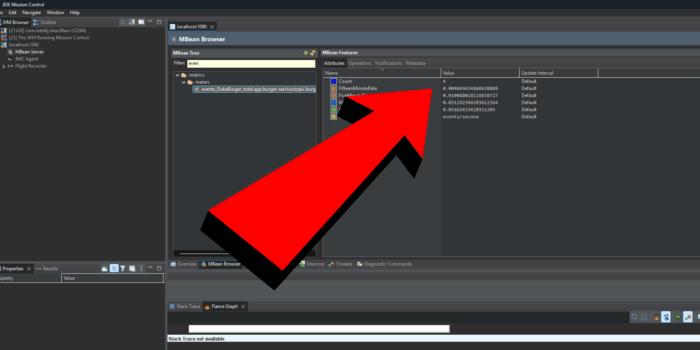
JMC for Micrometer & Prometheus in Spring Boot: Kafka Burger Orders
🔵🔵🔵🔵🔵🔵🔵🔵🔵🔵🔵⚪
Takeaways
- Small steps win: REST → Kafka → Consumer → Metric is a powerful, simple pipeline.
- Micrometer first: Write metrics once; swap backends later (Prometheus today, Datadog tomorrow). See
- Tags matter: Add
appandtopictags now. Your future dashboards will thank you. - Avro stays lean: A tiny schema keeps payloads small and generated classes easy to use.
- CloudEvents optional: The headers help interoperability but are not required for Micrometer. Cloud Events
🔵🔵🔵🔵🔵🔵🔵🔵🔵🔵🔵🔵
Conclusion
You just wired Micrometer and Prometheus in Spring Boot around a Kafka flow and produced a clean, tagged counter you can graph and alert on. From here, extend the metric set (timers for latency, gauges for queue depth), add dashboards, and create an alert when events_DukeBurger_total stalls or spikes.
Further Reading (Foojay)
- Spring Boot + Kafka Streams testing & routing:
https://foojay.io/today/spring-boot-kafka-streams-event-routing-testing/ - Make Spring Batch fly with native image & GraalVM:
https://foojay.io/today/speed-up-your-spring-batch-with-native-image-and-graalvm/
Recommended Courses (go further with certification)
- Java OCP prep (Udemy):
https://www.udemy.com/course/ocp-oracle-certified-professional-java-developer-prep/?referralCode=54114F9AD41F127CB99A - Spring Professional – 6 full tests (Udemy):
https://www.udemy.com/course/spring-professional-certification-6-full-tests-2v0-7222-a/?referralCode=04B6ED315B27753236AC - Spring Certification Book (Leanpub/ Kindle/ Paperback):
https://spring-book.mystrikingly.com/
References
- Micrometer docs and Prometheus registry overview. Micrometer Application Observability+1
- Spring Boot Actuator metrics. See
@KafkaListenerreference. See- CloudEvents Java SDK. Cloud Events
Found a mistake, or something to add? Edit this page on GitHub

Vincent Vauban
Oracle Ace, VMWare Expert, and Fullstack software developer with over 15 years of experience in Java, Spring, JavaScript, React, and Angular. As a software engineer and Udemy instructor, he brings his expertise to a variety of industries, including banking, …