SpringBoot and Kafka Streams – Event Routing & Testing
 Vincent Vauban
Welcome to this hands-on guide to building a Spring Boot Kafka Streams application! (SpringBoot and Kafka Streams).
In this article, I’ll walk you through a project I built during the first day of a three-day Kafka Streams training. The goal? Validate sightseeing events in Lille based on predefined timetables and route the data accordingly.
Let’s explore how Kafka Streams powers a real-time city tour experience! 🧭
🔵⚪⚪⚪⚪⚪⚪⚪⚪⚪
1️⃣ The Use Case: Lille City Tour
Imagine you’re planning a visit through Lille, France.
You want to see:
- Gare Lille Flandres
- St. Maurice Church
- Les Moules Restaurant
- Place du Général de Gaulle
- Opera, and more…
Each sightseeing spot has a specific opening and closing time.
Visitors submit their visit plans, and we validate whether the visit can be scheduled within the location’s allowed timetable.
🔵🔵⚪⚪⚪⚪⚪⚪⚪⚪
2️⃣ The Goal
What I want to do!
- Receive event submissions (location + visit time).
- Check whether the visit is valid.
- Route events:
- ✅ Valid visits → trip-steps topic.
- ❌ Invalid visits → DLQ topic (dead-letter queue).
🔵🔵🔵⚪⚪⚪⚪⚪⚪⚪
3️⃣ Tech Stack
What I used for this demo
- Apache Kafka
- Kafka Streams
- Kafka UI for topic management
- Kafka Streams Viz to visualize the topology
- Docker for local environment
- Java for stream logic
🔵🔵🔵🔵⚪⚪⚪⚪⚪⚪
4️⃣ Data Modeling
What is the model of the visit data
Each location has its own timetable:
[
  {
    "location": "Gare Lille Flandres",
    "timeRanges": [
      { "start": "08:00", "end": "12:00" },
      { "start": "14:00", "end": "18:00" }
    ]
  },
  {
    "location": "St. Maurice Church",
    "timeRanges": [
      { "start": "09:00", "end": "17:00" }
    ]
  }
]
Each event from the visitor looks like:
{
  "location": "Beffroi",
  "hour": "13:00"
}
The system will return:
{
  "location": "Beffroi",
  "hour": "13:00",
  "status": "OK"
}
Or, if the visit falls outside the available range:
{
  "location": "Beffroi",
  "hour": "20:00",
  "status": "KO"
}
🔵🔵🔵🔵🔵⚪⚪⚪⚪⚪
5️⃣ Kafka Streams Topology
🧠 Concept
Kafka Streams builds real-time processing flows using topologies.
In our case:
Input: visit-event topic
Processing:
- Deserialize the message
- Validate against ValidTimetableService
- Set status as OK/KO
- Branch stream
Output:
- trip-steps for valid events
- DLQ for invalid ones
🧾 Key Logic
The processors involved:
KStream<String, VisitEvent> rawVisits = builder.stream("visit-event");

KStream<String, VisitStatus> validatedVisits = rawVisits
    .mapValues(event -> {
        boolean isValid = validTimetableService.isValid(event.getLocation(), event.getHour());
        return new VisitStatus(event.getLocation(), event.getHour(), isValid ? "OK" : "KO");
    });

validatedVisits.split()
    .branch((key, status) -> "OK".equals(status.getStatus()), Branched.withConsumer(ks -> ks.to("trip-steps")))
    .branch((key, status) -> "KO".equals(status.getStatus()), Branched.withConsumer(ks -> ks.to("DLQ")));
🖥️ Visualization
Using Kafka Streams Viz:Kafka Streams Topology Visualizer)
I generated this simple topology: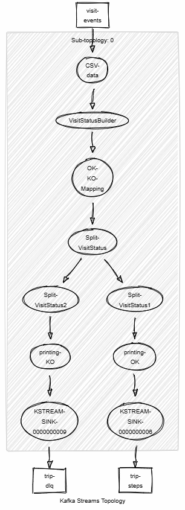
Or in simple way:[ visit-event ] --> [ validation logic ] --> [ trip-steps / DLQ ]
Each branch of the stream is defined clearly, allowing easy debugging and maintainability.
🔵🔵🔵🔵🔵🔵⚪⚪⚪⚪
6️⃣ Tools in Action
🔄 Kafka Topics: All messages are pushed and consumed in real time.
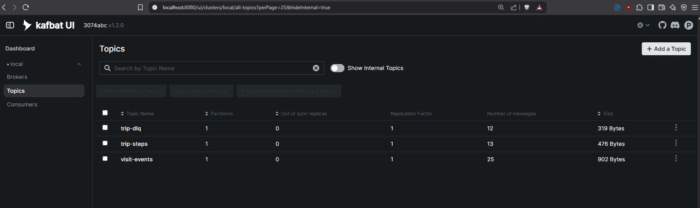
Topics involved: visit-events, trip-steps, trip-dlq
🧰 Kafbat UI: Used to inspect Kafka topics and payloads during development.
kafbat-ui:
  container_name: kafbat-ui
  image: ghcr.io/kafbat/kafka-ui:latest
  ports:
    - 8080:8080
  environment:
    DYNAMIC_CONFIG_ENABLED: 'true'
    KAFKA_CLUSTERS_0_NAME: local
    KAFKA_CLUSTERS_0_BOOTSTRAPSERVERS: kafka:29092
🧭 ValidTimetableService: A custom utility that loads all location timetables and verifies visit requests.
/**
     * Sends the list of events to the specified Kafka topic.
     * @param bootstrapServers Kafka bootstrap servers
     * @param topic Kafka topic to send messages to
     * @param events List of CSV event lines to send
     */
    public static void produceEvents(String bootstrapServers, String topic, List<String> events) {
        Properties props = new Properties();
        props.put(ProducerConfig.BOOTSTRAP_SERVERS_CONFIG, bootstrapServers);
        props.put(ProducerConfig.KEY_SERIALIZER_CLASS_CONFIG, StringSerializer.class.getName());
        props.put(ProducerConfig.VALUE_SERIALIZER_CLASS_CONFIG, StringSerializer.class.getName());

        try (KafkaProducer<String, String> producer = new KafkaProducer<>(props)) {
            for (String event : events) {
                ProducerRecord<String, String> record = new ProducerRecord<>(topic, null, event);
                producer.send(record, (metadata, exception) -> {
                    if (exception != null) {
                        System.err.println("Failed to send event: " + event);
                        exception.printStackTrace();
                    } else {
                        System.out.printf("Sent: %s to partition %d offset %d%n", event, metadata.partition(), metadata.offset());
                    }
                });
            }
            producer.flush();
        }
    }
🧪 Unit Tests: Every logic block is testable, ensuring accuracy before production deployment.
class VisitStatusTopologyTest {

    private TopologyTestDriver testDriver;
    private TestInputTopic<String, String> inputTopic;
    private TestOutputTopic<String, VisitStatus> okOutputTopic;
    private TestOutputTopic<String, VisitStatus> koOutputTopic;
    private final String inputTopicName = "visit-events";
    private final String okTopicName = "trip-steps";
    private final String koTopicName = "trip-dlq";

    private final Serde<String> stringSerde = Serdes.String();
    private final Serde<VisitStatus> visitStatusSerde = new VisitStatusSerde();

    @BeforeEach
    void setup() {
        VisitStatusTopology topology = new VisitStatusTopology();
        Topology kafkaTopology = topology.build();

        Properties props = new Properties();
        props.put(StreamsConfig.APPLICATION_ID_CONFIG, "test-visit-status-app");
        props.put(StreamsConfig.BOOTSTRAP_SERVERS_CONFIG, "dummy:9092");
        props.put(StreamsConfig.DEFAULT_KEY_SERDE_CLASS_CONFIG, Serdes.String().getClass());
        props.put(StreamsConfig.DEFAULT_VALUE_SERDE_CLASS_CONFIG, Serdes.String().getClass());

        testDriver = new TopologyTestDriver(kafkaTopology, props);

        inputTopic = testDriver.createInputTopic(inputTopicName, stringSerde.serializer(), stringSerde.serializer());
        okOutputTopic = testDriver.createOutputTopic(okTopicName, stringSerde.deserializer(), visitStatusSerde.deserializer());
        koOutputTopic = testDriver.createOutputTopic(koTopicName, stringSerde.deserializer(), visitStatusSerde.deserializer());
    }

    @AfterEach
    void teardown() {
        testDriver.close();
    }

    @Test
    void testValidVisitGoesToOkTopic() {
        // Given a valid visit event within timetable range (e.g. Place Louise de Bettignies is always valid)
        String input = "Place Louise de Bettignies,12:00,OK";

        // When sending input record
        inputTopic.pipeInput(null, input);

        // Then output in OK topic with status "OK"
        assertFalse(okOutputTopic.isEmpty());
        VisitStatus visitStatus = okOutputTopic.readValue();
        assertEquals("Place Louise de Bettignies", visitStatus.location());
        assertEquals("12:00", visitStatus.time());
        assertEquals("OK", visitStatus.status());

        // NOK topic should be empty
        assertTrue(koOutputTopic.isEmpty());
    }
//...👨💻Full repsoitory on GitHub: vinny59200 / kstream-lille-city-tour
🔵🔵🔵🔵🔵🔵🔵⚪⚪⚪
7️⃣ What I Learned
This project helped solidify my understanding of:
- Stream processing design with Kafka
- Real-time data validation
- Branching and routing event streams
- Working with external services (like timetable checks) inside a stream
And most importantly, building a real-life use case that’s both educational and fun!
🔵🔵🔵🔵🔵🔵🔵🔵⚪⚪
8️⃣ Next Steps
Going further with SpringBoot and Kafka Streams
Here’s what could be added next:
- Store validated trips in a database (PostgreSQL or MongoDB)
- Add user context and preferences
- Visualize city tour analytics on a live dashboard
- Expose REST endpoints to submit visits and query status
🔵🔵🔵🔵🔵🔵🔵🔵🔵⚪
9️⃣ Try It Yourself
Want to explore this yourself?
Clone the project (vinny59200 / kstream-lille-city-tour), run the containers, and start submitting events to see the validation in action.
🧪 Tip: Modify the timetable and see how event routing changes instantly!
🔵🔵🔵🔵🔵🔵🔵🔵🔵🔵
🔟 Conclusion
SpringBoot and Kafka Streams – Event Routing & Testing
Kafka Streams is an incredibly powerful tool for building real-time event processing pipelines.
Through this Lille City Tour demo, we created a tangible use case that demonstrates stream branching, data validation, and error routing with just a few lines of code.
Want the code? vinny59200 / kstream-lille-city-tour
Thanks for joining the tour! 🇫🇷✨
See also
Related to SpringBoot and Kafka Streams
📺 https://youtu.be/s07d3SmoBMI
👩🏫 https://developer.confluent.io/courses/kafka-streams/get-started
Found a mistake, or something to add? Edit this page on GitHub

Vincent Vauban
Oracle Ace, VMWare Expert, and Fullstack software developer with over 15 years of experience in Java, Spring, JavaScript, React, and Angular. As a software engineer and Udemy instructor, he brings his expertise to a variety of industries, including banking, …