Taking VSCodium for a Spin
 Nicolas Frankel
As part of my new job on Apache APISIX, I write less Java and Kotlin code.
And when I do, the code is really simple.
My coding hours (unfortunately not days) involve:
- A lot of containerization, including
Dockerfile,docker-compose.yml, and soon Kubernetes manifests - Some Python for scripting jobs - I abandoned Kotlin Scripting for this
- A bit of Lua because I want to learn it as part of my job
- A bit of Rust because I want to learn it for fun
- A bit of Kotlin because I still love it
Because of this, I didn’t renew my IntelliJ Ultimate license early this year, and I fell back on the Community one.
I installed the relevant plugins, and I happily continued my coding routine.
Recently, I noticed that I used only a couple of features:
- Auto-completion, enhanced with the TabNine plugin
- Running and debugging
And that’s all!
I didn’t even use the Docker Compose integration, preferring to type docker compose up and docker compose down. I was actually using a richly featured for trivial tasks! After realizing it, I thought it might be time to try another IDE.
A couple of years ago, VSCode was all the rage. I didn’t pay any attention because I assumed it was mainly for front-end development, and I did a lot of coding on the JVM then.
Things have changed: the VSCode ecosystem has matured, and lots of plugins are available. I decided to give it a shot.
To start with, I looked a bit under the cover:
Microsoft’s vscode source code is open source (MIT-licensed), but the product available for download (Visual Studio Code) is licensed under this not-FLOSS license and contains telemetry/tracking. The VSCodium project exists so that you don’t have to download+build from source. This project includes special build scripts that clone Microsoft’s vscode repo, run the build commands, and upload the resulting binaries for you to GitHub releases. These binaries are licensed under the MIT license. Telemetry is disabled. –VSCodium
The paragraph above made me switch from VSCode to VSCodium. Installing it is just a command-line away:
brew install vscodium
VSCodium is built around a plugin architecture. The application is very lightweight, but tons of extensions contain all the possible features you can wish for.
Because I needed to update one of my Python projects, I searched for the relevant plugin. Navigate to Extension, then search for “python”.
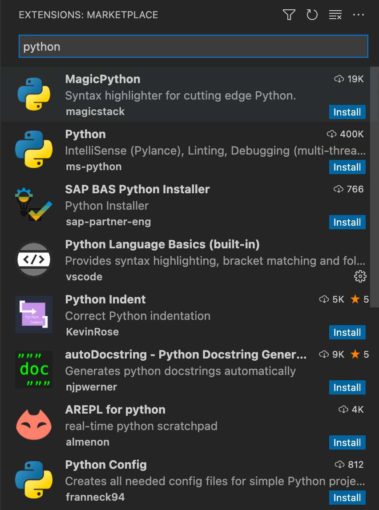
I installed the “official” Python extension. As I was there, I also installed the TabNine one.
Getting used to a new IDE is always an investment. It took me three attempts to switch from Eclipse to IntelliJ IDEA. Here are three main problems that I had to solve immediately:
- Find how to set a breakpoint - it’s the leftmost gutter in the editor view
- Multiline edit - [Opt + Cmd + Arrow]
- Remember to save after editing! I had to forget to save after switching from Eclipse to IntelliJ IDEA; now I need to remember it again. Life is a circle.
To use VSCodium during my conference talks, I have two additional requirements:
- Zooming with the mouse. Go to menu VSCodium > Preferences > Settings and search for “zoom”.
- View each Git commit and navigate from one to the other. The default Git view is not enough. I installed GitLens, adding the feature to the Git view.
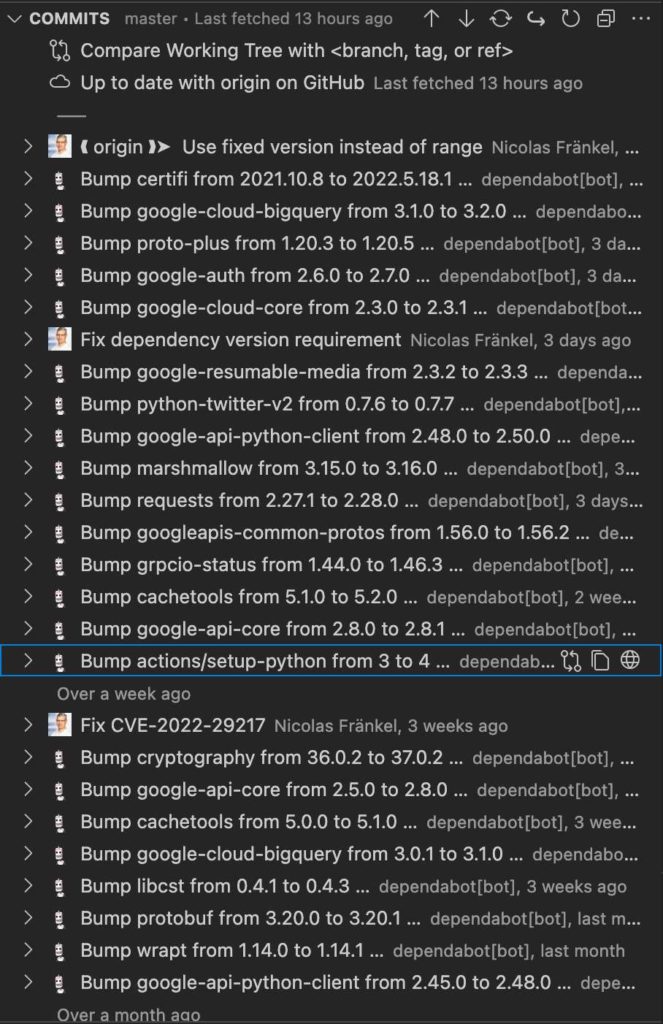
At this point, I think I’m ready to use VSCodium for my next talk.
To go further:
Originally published at A Java Geek on June 17^th^, 2022
*[IDE]: Integrated Development Environment
Found a mistake, or something to add? Edit this page on GitHub

Nicolas Frankel
Technologist focusing on cloud-native technologies, DevOps, CI/CD pipelines, and system observability. His focus revolves around creating technical content, delivering talks, and engaging with developer communities to promote the adoption of modern software …