TestBox 7: Real-Time Feedback, a Browser-Based IDE, and Modern Testing Workflows on the JVM
 Cristobal Escobar
TestBox 7.x focuses on improving testing workflows for BoxLang and CFML applications. This release introduces improvements to the BoxLang CLI runner , real-time streaming test execution via SSE , dry run capabilities, a browser-based TestBox RUN interface, and several developer experience enhancements.
Check out the what’s new here: https://testbox.ortusbooks.com/readme/release-history/whats-new-with-7.0.0
TestBox RUN: A Browser IDE for Your Tests


The centerpiece of TestBox 7 is TestBox RUN : a self-hosted, single-page web app (bx/tests/index.bxm) that you drop into any BoxLang project and open in a browser. No build toolchain. No external service. Just BoxLang.

It communicates with your existing runner.bxm or runner.cfm endpoints and streams spec results in real time via Server-Sent Events. Results appear in the test tree as each spec finishes, green for passing, red for failures, with full error messages; long before the full suite completes.
What You GetWhat You Get

- Real-time streaming test tree — live updates per spec, not per suite
- Dark / Light theme with
localStoragepersistence
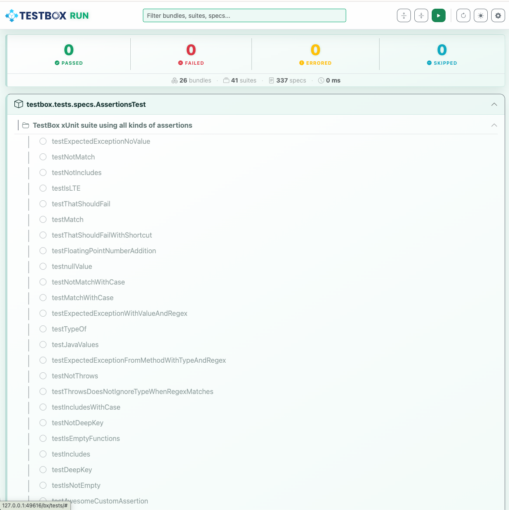
- Live search + status filters — filter by bundle, suite, or spec name; chips for Passed / Failed / Errored / Skipped

- Per-bundle Run button — re-run a single bundle without touching the rest

- Debug Buffer Panel — captured TestBox debug output surfaced per-bundle

- Floating progress widget — current bundle, specs completed vs. total, animated progress bar
- Configurable settings — runner URL, directory, bundle pattern, labels, excludes — all saved in
localStorage
Every setting is also overridable via URL query params, making CI integration clean:
/tests/?directory=tests.specs.integration&labels=slow&runnerUrl=/tests/runner.bxm
Keyboard Shortcuts
| Shortcut | Action |
|---|---|
| ⌘/Ctrl + K | Focus search bar |
| ⌘/Ctrl + Enter | Run all tests |
| ⌘/Ctrl + . | Reload / rediscover tests |
| ⌘/Ctrl + , | Open Settings |
| ⌘/Ctrl + B | Toggle expand/collapse all bundles |
| ⌘/Ctrl + D | Toggle dark/light mode |
Getting Started
TestBox RUN ships automatically with every TestBox 7 install under bx/tests/. ColdBox apps generated via the ColdBox CLI include it out of the box. For new projects:
testbox generate harness --help
Note: TestBox RUN requires a running web server and a
runner.bxm`` endpoint with SSE support via BoxLang. For pure CLI apps, use the BoxLang runner with ``--stream(see below).
Coming Soon: TestBox RUN Desktop App
We’re actively building a native desktop app version of TestBox RUN on the BoxLang Desktop Runtime — connect to any local or remote runner URL and get the same streaming UI without a browser. Watch testbox.run for early access.
Streaming Test Execution via SSE
TestBox 7 ships a brand-new StreamingRunner that pushes each spec result to the client the moment it completes, rather than buffering the entire suite.
StreamingRunner (Programmatic)StreamingRunner (Programmatic)
component {
    function streamTests( event, rc, prc ) {
        event.setHTTPHeader( name="Content-Type", value="text/event-stream" );
        event.setHTTPHeader( name="Cache-Control", value="no-cache" );

        new testbox.system.runners.StreamingRunner(
            bundles  = "tests.specs",
            options  = {},
            reporter = "text"
        ).run();
    }
}
BoxLang CLI --stream Flag
The BoxLang CLI runner gets native streaming support:
./testbox/run --stream
./testbox/run --directory=tests.specs --stream
This is especially useful in CI pipelines where live progress matters more than waiting for a buffered final report.
Dry Run & Spec Discovery
Two long-requested features land in TestBox 7: spec discovery and dry run mode. Audit exactly what would run before committing to a full suite execution.
Runner Dry Run
If you call the runner.bxm|cfm with a ?dryRun=true it will return back to you a JSON representation of what the test executions would look like.
Programmatic Dry Run
var tb      = new testbox.system.TestBox( bundles = "tests.specs" );
var results = tb.dryRun();
CLI Dry Run
./testbox/run --dry-run

Lists every suite and spec that would execute, with labels and skip reasons — perfect for coverage audits and CI test inventory reporting.
JSON Output
Need to feed results into another tool?
./testbox/run --dry-run=json
./testbox/run --dry-run=json --bundles=tests.specs.MySpec | jq .
Dry run respects all the same filters as a normal run: --labels, --bundles, --directory, --testSuites, --testSpecs.
BoxLang CLI Runner — New Power Options
The BoxLang runner gets a substantial set of new flags for fine-grained control over output, failures, and performance analysis.
Focus on Failures
./testbox/run --show-failed-only
Stack Trace Control
./testbox/run --stacktrace=short   # condensed (default)
./testbox/run --stacktrace=full    # complete Java/BoxLang trace
Output & Performance Flags
# Suppress passing or skipped specs
./testbox/run --show-passed=false
./testbox/run --show-skipped=false

# Abort after N failures
./testbox/run --max-failures=10

# Flag slow specs
./testbox/run --slow-threshold-ms=500

# Report the N slowest specs at the end
./testbox/run --top-slowest=5
Combine them for a tight CI workflow:
./testbox/run --show-failed-only --stacktrace=short --max-failures=5 --top-slowest=3
Application Mappings Auto-Load (TESTBOX-440)
The BoxLang runner now automatically loads Application.bx mappings from your project root before running tests. Custom path mappings, datasources, and settings are available to your specs with zero extra configuration — bringing the CLI experience much closer to a full web server environment.
Other Notable Improvements
ConsoleReporter — Hide Skipped Tests (TESTBOX-433)
Stop noisy skipped-spec output when you have many pending specs:
var testbox = new testbox.system.TestBox(
    bundles  = "tests.specs",
    reporter = {
        type    : "testbox.system.reports.ConsoleReporter",
        options : { hideSkipped : true }
    }
);
Or from the CLI: --show-skipped=false
Suite Filtering Fixes (TESTBOX-435)
Direct suite name matching is now reliable at any nesting depth. If a suite’s name exactly matches testSuites, it always runs — no more surprises with nested suites getting skipped.
./testbox/run --testSuites="My Integration Suite"
TestBox CLI Updates (v1.8.0)
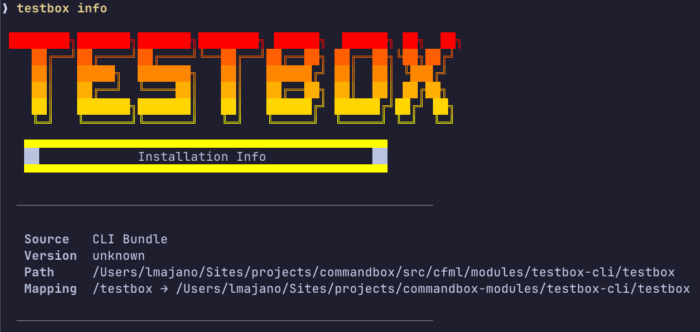
The testbox-cli CommandBox module hits 1.8.0 with two new commands:
# Show installed version, path, and project config
testbox info

# Force a clean reinstall of the CLI module
testbox reinstall
Streaming is also available via the CLI:
testbox run --streaming
testbox run --streaming --verbose   # include passing specs in live output
Engine Support
| Engine | Status |
|---|---|
| BoxLang 1.x+ | ✅ PREFERRED |
| Lucee 7.x | ✅ NEW |
| Lucee 6.x | ✅ |
| Lucee 5.x | ⚠️ DEPRECATED |
| Adobe 2025 | ✅ |
| Adobe 2023 | ⚠️ DEPRECATED |
| Adobe 2021 | ❌ Dropped |
Adobe 2021 is no longer supported. Upgrade to Adobe 2023+ or migrate to BoxLang.
Upgrade Now
TestBox 7 is available today via CommandBox:
box install testbox
Or pin to 7.x:
box install testbox@^7.0.0
Full release notes and issue links are in the TestBox documentation. As always, file bugs and feature requests in our JIRA. You can also check out the what’s new guide here: https://testbox.ortusbooks.com/readme/release-history/whats-new-with-7.0.0
Found a mistake, or something to add? Edit this page on GitHub
Cristobal Escobar
Development and promotion of BoxLang, a modern dynamic JVM language deployable on various platforms, including all operating systems, web servers, Java application servers, AWS Lambda, iOS, Android, web assembly, and more.